

Automate the routine. Own your time.
أتمِت الروتين، وامتلك وقتك.
YaSulix makes small programs that take repetitive office work off your hands. They run on your own computer, keep your data private, and give your time back to the work that matters.
See our productsAbout us
Our vision
To be the region's leading name in automating routine office work, so no employee spends their time on work a machine can do.
Our mission
We build simple, secure programs that take over repetitive tasks in companies. They run on our clients' own computers, keep their data in their hands, and give teams their time back for work that matters.
Our values
- SimplicitySoftware that works from day one, with no long training and no IT team.
- Security and privacyClient data stays on the client's computer.
- AccuracyWe check every step and stop before making a mistake.
- Close to our clientsFast support in Arabic and English.
Our products
Each product does one job, and does it well.

 Posts your entries from Excel into any ERP system row by row, and exports the system's data back to Excel, checking every step.
Learn more
For accounting and data-entry teams
Load and export data between Excel and your ERP, automatically.
Record the task once, the way you do it by hand. Then let Tarheel post hundreds of rows from Excel into the system, or export its records to Excel, row by row, while you watch.
Download coming soon, with a free 10-day trial. For Windows.
Runs on Windows, with any ERP system. Your data never leaves your computer.
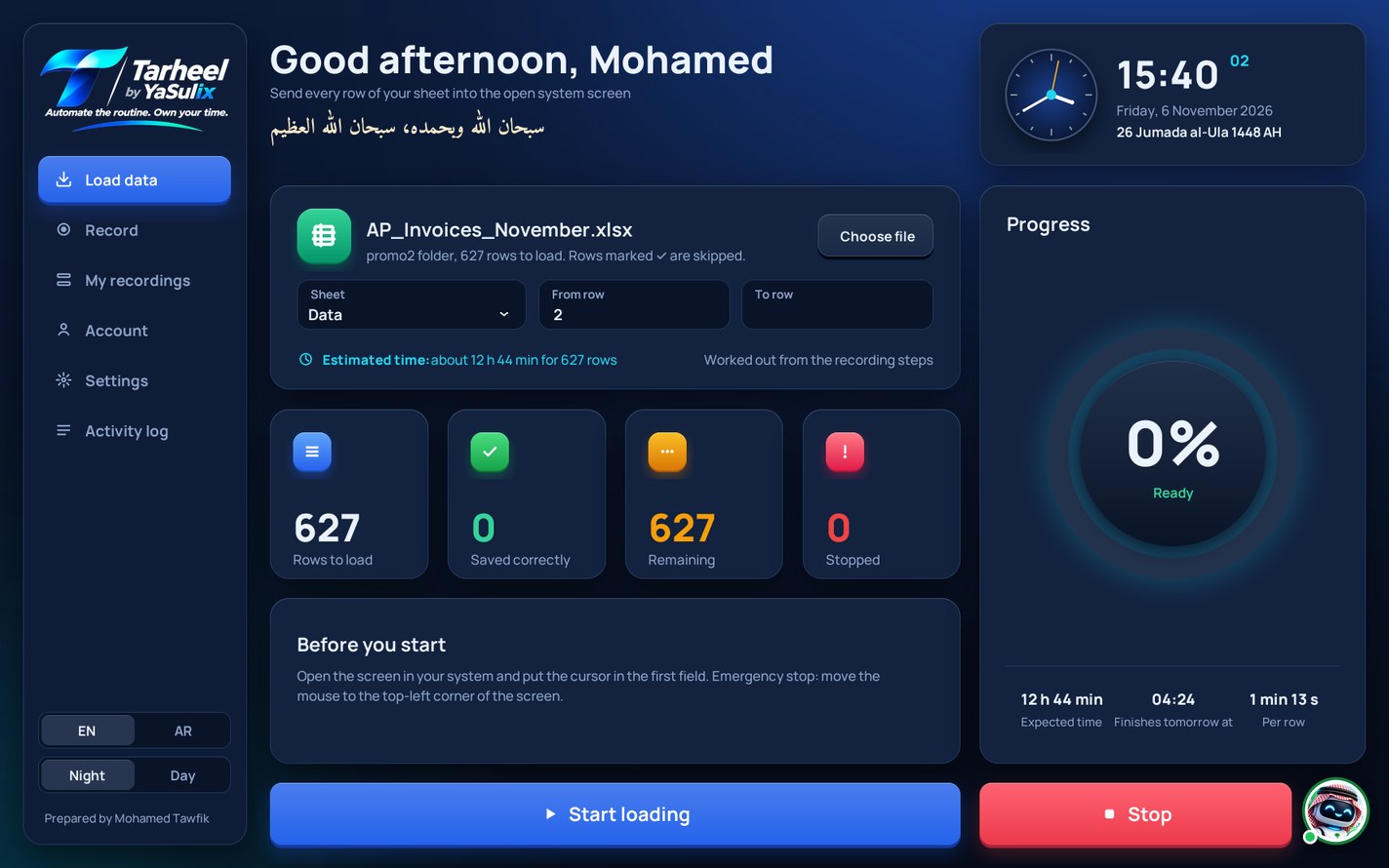
Watch Tarheel in two minutes
From recording one entry to posting hundreds of rows.
Three steps, then it works on its own
No system integration and no IT project. It works with the screen the way you do.
-
1
Record
Open the screen in your system, press Record load in Tarheel, and enter one transaction as usual.
-
2
Fill
Tarheel turns your recording into a ready Excel sheet. Paste your transactions in, one row each.
-
3
Post
Press Start loading. Tarheel enters the rows, marks each saved one, and tells you the time left.
And the other way, too
Record once how you take data from your system's screen to Excel, and Tarheel repeats it for every record. It only reads, and types nothing in the system except what you search for.
Export records to Excel
It goes through the records on the system's screen one by one, copies the fields you chose into a new Excel file, and stops by itself at the last record.
| Invoice no. | Date | Amount |
|---|---|---|
| INV-24100 | 01-11-2026 | 1,275.77 |
| INV-24101 | 01-11-2026 | 30,735.28 |
| INV-24102 | 02-11-2026 | 997.48 |
Look up and bring back
Have a column of receipt numbers in Excel? Tarheel searches the system for each one, copies what you ask for, such as the invoice number, and writes it beside it in the last column.
| Receipt no. | Invoice no. |
|---|---|
| RCPT-24001 | INV-77120 |
| RCPT-24002 | INV-77123 |
| RCPT-24003 | INV-77126 |
Record two records with copy and paste. Tarheel turns them into an Excel template you review and fill, then press Start export.
It stops before it makes a mistake
Automatic loading is only useful if you can trust it, so Tarheel watches every step.
- Checks every valueReads each field back after typing and stops at once if it differs from the sheet.
- Waits for the systemNever types while the system is busy, and stops if another window comes to the front.
- Continues where it stoppedRemembers the last saved row, so nothing is entered twice.
- Sanad, your helperChecks your sheet before loading and explains any stop. Works offline.
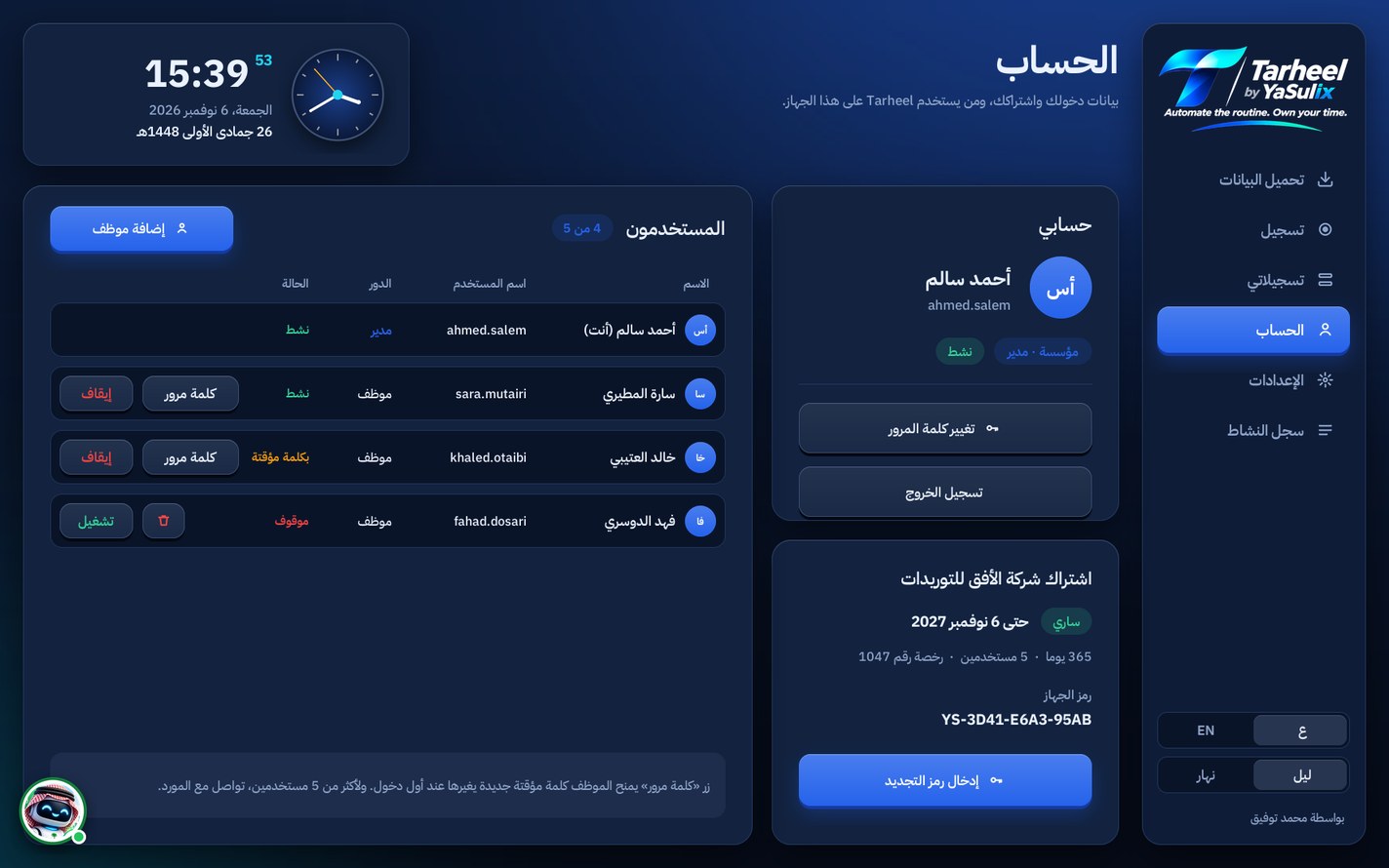
- Company accountsThe account manager adds employees, stops them, and resets their passwords.
- Arabic and EnglishThe interface comes in both languages and pastes Arabic text exactly as written.
Tarheel pricing
Simple subscriptions with no setup fees. Prices in Saudi riyals.
Try Tarheel free for 10 days
Download the program, open it, press Ask for a free trial and write your email. Your activation code arrives within one working day. The trial covers 200 rows of loading and exporting, with no card needed.
Individual · Monthly
149SAR / month
One user on one computer. Good for seasonal work.
Choose this planIndividual · Yearly
2 months free1,490SAR / year
One user, all year, with a reminder before renewal.
Choose this planCompany
129SAR / user / month
From 3 users. An account manager handles employees and their passwords.
Choose this planOrder a subscription
Fill in the form and we will contact you within one working day to arrange payment and send your activation code.
Questions
Which systems does Tarheel work with?
Any ERP or accounting system on Windows, and systems that run in a browser, because it enters data from the keyboard like an employee does. Try one or two entries on your screen before a large load.
Can Tarheel move data from the system to Excel?
Yes. In Export data you record two records with copy and paste, and Tarheel repeats it for every record and writes them to an Excel file. It can also search the system with values from your file and write the answers beside them.
Is there a free trial?
Yes: 10 days and 200 rows of loading and exporting. Download Tarheel, open it and press Ask for a free trial; the activation code reaches your email. When you subscribe, your recordings and reports stay as they are.
Does it need an integration or special permissions?
No. It uses the keyboard and mouse like an employee does, with that user's own permissions in the system.
Does my data leave my computer?
No. Tarheel works offline, and your files and reports stay on your computer.
What happens when the subscription ends?
Only loading stops; your recordings and reports stay as they are. Tarheel reminds you two weeks before.
I changed computers. What now?
Send us the new computer code and we will send a new activation code for the same subscription.
Can a company's employees work on their own computers?
Yes. The company's account manager adds each employee with their computer code, and Tarheel makes a code that activates it on that computer, within the number of users in the subscription.